
Case study
The business in your pocket, even offline.
An offline-first business app for Nigerian SMEs — sales, stock, customer debts and profit in one place on iOS and Android, built to keep recording when the network drops.
At a glance
- Product
- Shelf
- Platforms
- iOS 15+ and Android 8+
- Scope
- Mobile app + API
- Users
- Owners, managers and staff
- Stack
- Expo · React Native · NestJS
01
04
Core screens
02
03
Staff roles
03
06
Export files
04
0
Signal needed to sell
01The brief
The business behind the numbers.
Nigeria · iOS + Android
A growing business keeps a surprising amount in its head: what sold, who owes, what is running low, what was spent, and whether the month actually made money.
When those answers live in a notebook and a WhatsApp thread, the owner closes the day by guessing. Credit sales are remembered by name, stockouts are discovered by a customer, and profit is whatever is left in the account — not what the books say.
We built Shelf as one offline-first app for iOS and Android, for teams that sell at a counter, in a branch or on the road — backed by a small API and an owner's console. The sale is recorded before the customer leaves, the catalogue lives on the phone, and the numbers reconcile themselves.
02The build
On the floor, and behind it.
Shelf has two jobs: make the next sale fast, and give the owner a truthful view of the business after the customer leaves.
Selling that keeps up
The everyday work of selling — built for one hand, a busy counter or a field visit, and a customer who is already leaving.
- Log a sale in seconds — Search the catalogue, add units or full cartons, adjust quantities and override a price for this sale only.
- Take part payments — Paid in full, part payment or true credit. The unpaid balance stays attached to the sale until it is settled.
- Share a receipt — Shelf writes a text receipt and hands it to the phone's share sheet — ready for WhatsApp, SMS or any app.
- Keep selling offline — A sale saves on the phone when the network drops, then syncs once when the signal returns.
- Collect a debt — Open a customer, see every unpaid sale and record a payment in one tap. The history stays on the sale.
- Know the customer — Attach a name to credit sales so the balance belongs to someone, not to a line in a notebook.
The owner's view
The stock, money and people behind the business — reconciled without a spreadsheet at closing time.
- Stock that tells the truth — Opening stock, stock in, set count, low-stock alerts and expiry dates, with every change kept in history.
- Profit you can trust — Revenue, cost of goods, expenses and the unpaid share, over today, seven days, thirty days or all time.
- Team with guardrails — Owner, Manager and Staff permissions enforced by the app and the API — not just hidden from the menu.
- Books out — Six spreadsheets or one ZIP for the period the owner chooses. Owner only, with links that expire.
- A queue that explains itself — Waiting changes are visible. A rejected sale shows the reason and stops retrying instead of posting twice.
- A sample business — A real, editable demo business for practising the flow before the owner's own records go in.
The app is not the weak point.
Roles, sessions, exports and offline replays are enforced on the server — not just hidden in the interface.
03A closer look
The app, up close.
The owner's home screen, and the decisions that keep trade moving when the network does not.
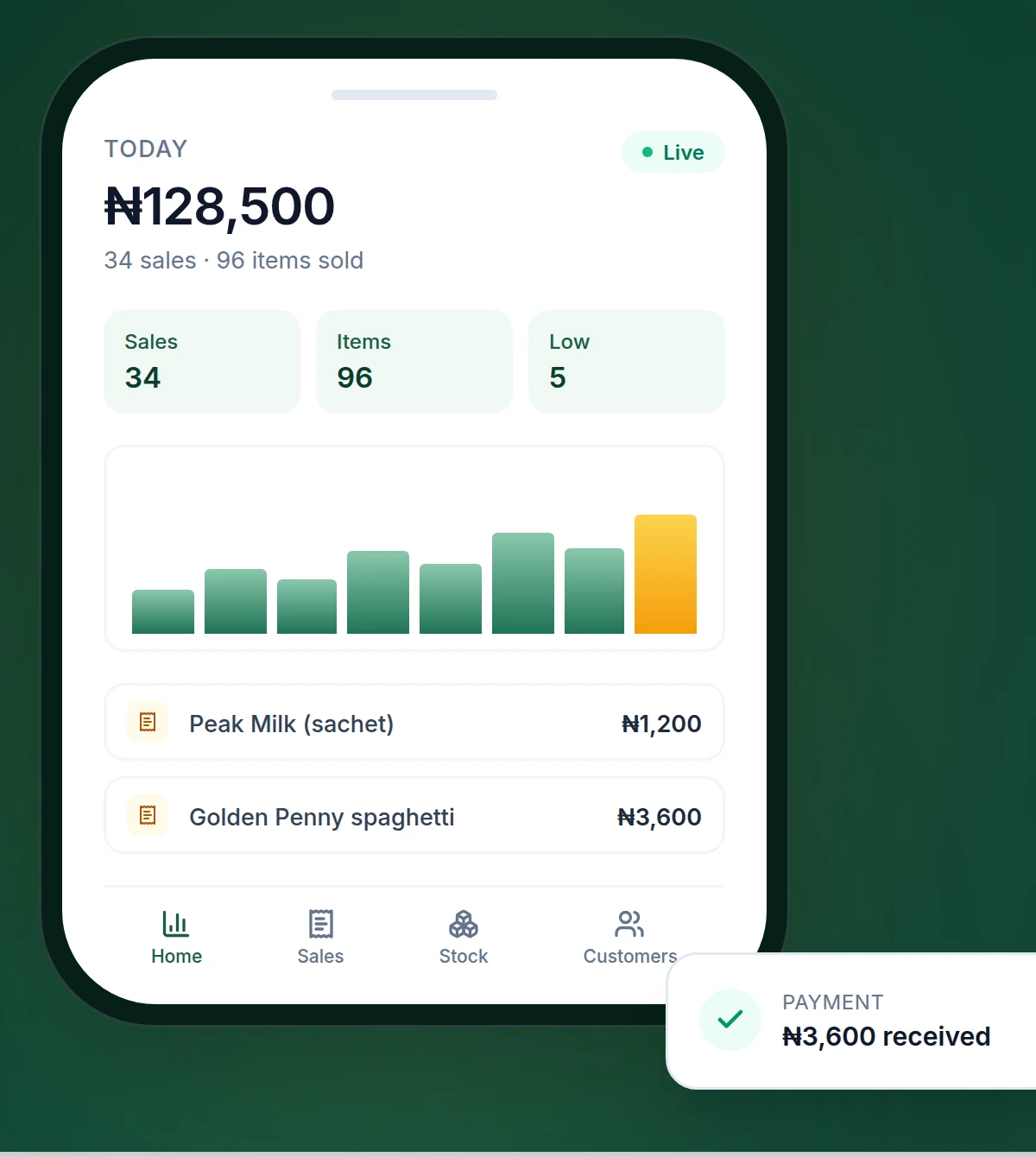
The day in one screen
Revenue, sales, low stock and what is owed — the four numbers an owner checks before locking up.
The sale
A sale, a part payment or a debt, recorded before the customer leaves.
The stock
Stock counts, reorder levels and expiry dates that update with every sale.
The month
Profit after cost of goods and expenses, top products and the share still sitting in unpaid debts.
Offline by design
The network can drop. The record cannot.
The catalogue is cached on the phone, so a sale can start cold. It is saved locally, queued with a key, and posted once when the signal returns.
- The last catalogue is available for product and customer search
- Every queued sale carries an idempotency key
- Rejected entries show the reason and stop retrying
- The sync queue is visible before the day closes
Sale recorded
The cart is built from the cached catalogue.
Saved on phone
SQLite keeps the sale before the request.
Queued with a key
The server remembers the key, so a retry is not a second sale.
Synced once
The queue shows what is waiting, and why anything was rejected.
04What's next
A conversation, not a form.
The app already records the business without the network. The next phase turns those same records into an assistant that answers in plain language — typed, spoken or on WhatsApp.
05Under the hood
A small stack with room to grow.
Chosen to keep the monthly cost low and the app usable on the phones a business team already carries — iPhones and Androids alike.
Built to run on Render and a managed Postgres database, with iOS and Android builds plus over-the-air updates through EAS.
Mobile
- iOS + Android
- Expo 57
- React Native 0.86
- React 19
- TypeScript
- Expo Router
On device
- Expo SQLite
- SecureStore
- TanStack Query
API
- NestJS 11
- Drizzle ORM
- PostgreSQL 16
- pg Pool
Auth & validation
- JWT
- bcrypt
- Zod
- Throttler
Delivery
- EAS Build
- EAS Update
- Docker
- Render
Quality
- Jest
- GitHub Actions
- TypeScript
Security built in
Not bolted on after launch.
- Access and refresh tokens in SecureStore
- Role checks on the API, not only in the UI
- Every query scoped to the signed-in business
- Idempotency keys on queued sales, payments and expenses
- Rate limits on login, reset and export links
- Owner-only returns, deletions and exports
- Helmet headers and request IDs on every API call
- Activity history for changes across the business
- Export links that expire after five minutes
06What changed
Less guessing. More knowing.
The measure is not downloads. It is whether the business closes the day with records it can trust.
07Services used
The pieces behind the build.
Need a system that works where your team does?
Tell us what still lives in a notebook.
We will scope the app, the sync model and the back office together.
More case studies available on request